- 51
- Country

- Gender
- Male
P1 LiveTiming
I actually only wanted to test something... and suddenly there was a LiveTiming system.
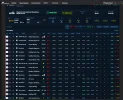
Our new P1 LiveTiming for Le Mans Ultimate and rFactor 2 is taking shape more and more.
A wide range of live data is already displayed clearly, including positions, classes, drivers and teams, car logos, lap and sector times, theoretical best laps, gaps, speed, pit stops, status and tyres. In addition, we already have session and flag status, sector flags, weather and track conditions. In LMU, multiclass filters, the Track Map and additional detailed views are already available as well. The goal remains a fast, clear and modern presentation in the typical P1 broadcast style — for spectators, drivers and teams.
Current status:
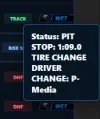
 Live positions Overall and class position Drivers, teams and car numbers Car and class logos Class filters Full Track Map with cars and pit lane Driver/class selection on the Track Map Last Lap / Best Lap / Theo. Best Live sector times S1 / S2 / S3 Best Sector / Purple / Green Gap to leader Gap to the car ahead Speed Lap count Detailed pit information such as PIT IN / STOP / PIT OUT Penalty details Session display Race flags Sector flags S1 / S2 / S3 Weather Air and track temperature Rain / Wetness Track Time / Time Left Live Feed Battle / Incident display Modern P1 broadcast look
Coming next:
 Positions gained and lost More Race Control information Driver Best Laps
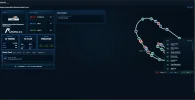
P1 Track Map
Live position of all cars on track Car number displayed directly on the vehicle Class colours for Hypercar / LMP2 / LMGT3 Live car count Class overview with number of cars Select drivers by class Driver name and team display Circuit with dedicated track graphics Start/finish line Separate pit lane display Track logo and track name Track facts such as length, number of corners, opening year and country Session display Track Time Air and track temperature Track Condition / Wetness Sector flags S1 / S2 / S3 Race Control section Live Event Feed PIT-IN events Incident, Pit, Penalty, Damage and Driver Change categories Class filters directly below the map Driver focus via the Class/Driver Browser Multiclass display in P1 broadcast styleComing next
More Race Control messages in the Event Feed More driver information when selecting a driverP1 Server Overview
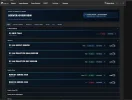
The P1 Server Overview provides a quick live overview of our active racing servers, including online status, current session, track, weather, race flags and connected cars.From there, users can jump directly into the available LiveTiming, Track Map and additional live views.
Ideas, suggestions and improvements are always welcome and can be posted here.

In the meantime, I’m working on finishing the Commentator View, which will provide additional live information specifically for our broadcast and commentary team.
That wouldn’t have happened if we’d had the driver swap.